InDesignProxy v1.0.7
CS5 Support?
InDesignProxy only supports InDesign versions between CS and CS4. If you need CS5 support, you’ll need to upgrade to Soxy (‘Son of InDesignProxy’), which supports InDesign CS5, as well as Illustrator, PDF files, Photoshop and Illustrator EPS files… Also, with Soxy there is no need to fiddle around in the Finder’s Get Info… dialog any more. For more info on Soxy, click here.
Download
See further below.
What it does
There’s a common problem on Mac OS X when there are multiple versions of Adobe® InDesign® or Adobe® InCopy® installed on the same computer. Double-clicking an .indd file’s icon will often cause the wrong application to launch.
To work around this problem, I’ve created a little application that alleviates the issue – it’s called InDesignProxy.
We also have a US$ 19.00 commercial product – Soxy, which takes the limited concepts of InDesignProxy much further.
Where InDesignProxy only supports InDesign and InCopy, Soxy supports InDesign, PDF, Illustrator, Acrobat, and QuarkXPress, and the list is still growing.
Also, Soxy is available for Windows – InDesignProxy is Mac-only
Lastly, Soxy is much easier to configure – in InDesignProxy you have to dig around a fair number of the Finder’s Get Info dialogs, and there is room for error.
With Soxy you can configure all from its concise setup screen.
The web page you’re currently on is about InDesignProxy – click here for more info on Soxy.
InDesignProxy fixes the problem by working as a ‘stand-in’ for InDesign and InCopy.
You can drag/drop any of a number of InDesign-related files onto the InDesignProxy application, and InDesignProxy will analyze the dropped document and will then forward it to the appropriate version of InDesign or InCopy.
You can also use the features of the Finder to have these files automatically opened by InDesignProxy instead of by Adobe InDesign – so your InDesign documents start behaving themselves even when you double-click them.
Currently, InDesignProxy supports .indd, .indt, .incd, .incx, or .icml files. Any InDesign-related files that carry a different file name extension are not supported.
If you’d like to show your appreciation, encourage us, and support us in our continued efforts to provide the designer and prepress communities with helpful tools, you can do a US$4 donation – roughly the price of a cup of coffee – by clicking the button below. You need to know that software development is not cheap and giving away freebies does not come easy for a small company like Rorohiko.
We use PayPal as our payment processor, but all you need is a credit card – you can send us a cup of coffee without need for a PayPal account.
Installing
To download the .dmg file, click the link below:
https://www.rorohiko.com/downloads/InDesignProxy.1.0.7.dmg
Open the .dmg file and drag the InDesignProxy application to your Applications folder.
After that, drag the InDesignProxy icon you just copied from your Applications folder to your Dock – this gives you a handy drag/drop point to drag/drop InDesign files. You can also double-click this Dock icon to bring up the InDesignProxy configuration screen
Alternatively, you can tell the Finder to open all .indd, .indt, etc… files with InDesignProxy instead of with InDesign. That way you can simply double-click any .indd file, have it open in LB InDesignProxy, who then launches the proper Adobe application and forwards the document.
When you do that, your files will get a green InDesignProxy icon at first. This is because InDesignProxy has not yet been able to determine what version of InDesign to associate with each of them.
Here’s a little ‘how-to’ – I’ll go through the motions for handling all files with an .indd file name extension.
The same procedure should then be repeated for any other file name extensions you might want to handle (.indt etc…).
In the Finder, go look for any .indd file to serve as a sample – here, I’ve got one sitting on my desktop.
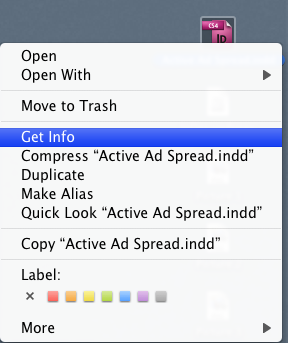
Hold down the Control key, and click the file’s icon – that should cause a contextual menu to appear. Select the Get Info menu option from the context menu.
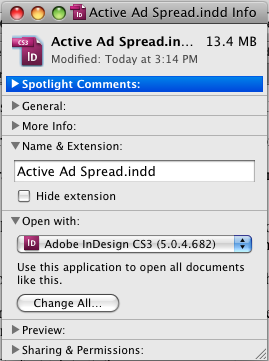
Find the Open With section – it will typically display one of your installed versions of InDesign.
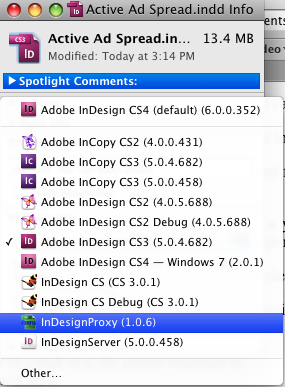
Use the popup menu to select InDesignProxy 1.0.6 or higher (as you can see, I have quite a few apps installed):
Then click the Change All… button so the change will affect all .indd files, not just this sample document.
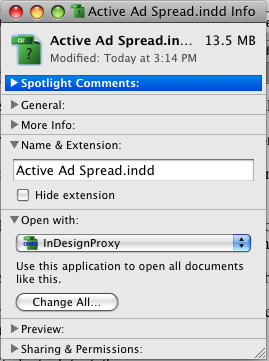
From now on, all .indd files on your computer will be opened via LB InDesignProxy.
Now repeat the same procedure for any other file name extensions you might want to handle (.indt etc…).
Using
To use: if the file name extension has been linked to LB InDesignProxy as described in the previous section, all you need to do is double-click the file.
Initially, all files assigned to InDesignProxy get a green icon:
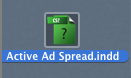
When you double-click such a file, LB InDesignProxy will analyze it and replace the green icon with the appropriate InDesign document icon – in this case the file was actually an InDesign CS file:

Is that cool or what? Y’all have Her Geekness Anne-Marie Concepción to thank for this feature; she’s the one that made me add it!
Alternatively, if you decided to not assign the .indd file name extension to InDesignProxy, you can drag/drop any InDesign file onto the InDesignProxy icon. It will open in the appropriate version of InDesign or InCopy.
An example: assume you have both InDesign CS3 and InDesign CS4 installed, and you already have InDesign CS4 running.
Dragging an InDesign CS3 document onto InDesignProxy will launch CS3 and open the document in CS3, even though CS4 is already running.
Configuring
By default, LB InDesignProxy assumes that the various InDesign and InCopy application files are in their ‘standard’ locations – i.e. if you have one or more versions of InDesign or InCopy installed then they are expected to be at respectively:
/Applications/Adobe InDesign CS/InDesign CS
/Applications/Adobe InCopy CS/InCopy CS
/Applications/Adobe InDesign CS2/Adobe InDesign CS2
/Applications/Adobe InCopy CS2/Adobe InCopy CS2
/Applications/Adobe InDesign CS3/Adobe InDesign CS3
/Applications/Adobe InCopy CS3/Adobe InCopy CS3
/Applications/Adobe InDesign CS4/Adobe InDesign CS4
/Applications/Adobe InCopy CS4/Adobe InCopy CS4
You don’t need to have all of these installed, of course! As soon as you have at least two versions of InDesign and/or InCopy installed, you can make use of LB InDesignProxy.
If the locations on your computer deviate from the ones listed above, you will need to configure LB InDesignProxy. (You might have manually selected a different install location, or possibly the install location might be different because you are on a non-English version of Mac OS X).
Configuring is fairly simple – double-clicking the LB InDesignProxy application icon itself gives you a preferences dialog.
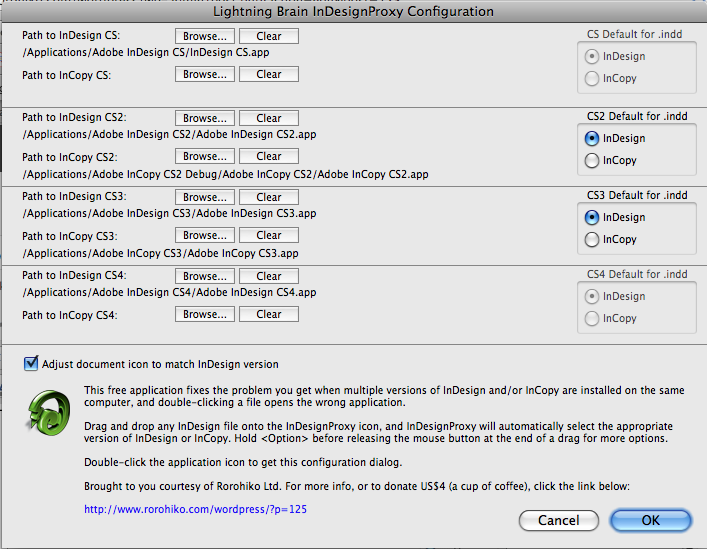
Use the Browse… buttons and and point out where each application file is – if you have a copy of that version available, of course.
LB InDesignProxy supports any mix of InDesign/InCopy CS/CS2/CS3/CS4 installations.
If any version is unavailable when you drop a document, it will ‘pick’ the closest higher version that is available – e.g. if you have CS and CS3 installed, but no CS2, it will use CS3 when presented with a a CS2 document.
Options Dialog
Rick Gordon suggested the following enhancement: from version 1.0.2 onwards, you can hold the <Option> (a.k.a. <Alt>) key while drag/dropping a document onto LB InDesignProxy.
This will bring up a dialog for selecting an alternate version of InDesign or InCopy – e.g. if you drag/drop a CS2 version, this dialog would allow you to enforce the document to be opened in InDesign CS3, even if you have InDesign CS2 installed.
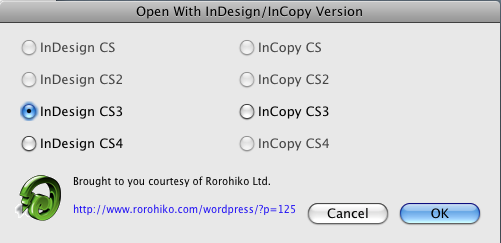
There’s a bit of a trick to it; the proper sequence is:
- click document icon in the Finder
- drag document icon onto LB InDesignProxy‘s icon, don’t release the mouse button yet
- press <Option>, then end the drag by releasing mouse button
- keep <Option> down until dialog appears
This dialog also comes in handy if you want to get rid of a whole lot of green icons without being forced to open each and every file.
Suppose you have a folder full of green-iconed files. Select all of them, and double-click one of the selected files while holding the <Option> key. Wait until the dialog appears, and then click Cancel.
InDesignProxy will now assign the proper icon to all files, but it won’t open any of them – that’s handy if you want to get proper icons on a few hundreds of InDesign documents in one go!
Version history
Version 1.0.7 – 20 March 2009
- InDesignProxy now attempts to not change the ‘modified’ date of the files. Previous versions of InDesignProxy would inadvertently cause an update of the ‘modified’ date of the InDesign file each time they would assign a new icon to the document.
In some cases, even with 1.0.7, the ‘modified’ date of files stored on some servers might still be affected. If you need to work around this issue, you can turn off the icon-assignment function of InDesignProxy.
Simply double-click the InDesignProxy icon to bring up the configuration screen and uncheck ‘Adjust document icon to match InDesign version’. That should protect the ‘modified’ date of your InDesign files from inadvertent change by InDesignProxy. Sadly enough, you’ll be stuck with the default green icons on your documents.
Version 1.0.6 – 20 January 2009
- Fixes issues when folder or drive names contained non-ASCII characters
- Supports the following file name extensions: .indd, .indt, .incd, .incx, .icml
- When a document is recognized and opened by InDesignProxy, it will add a custom Finder icon to the file – so InDesign CS files look like InDesign CS files, InDesign CS2 files get a different icon, and so on. If you assign all .indd files to be opened by InDesignProxy, they will all get a green icon at first. But as soon as you open them with InDesignProxy a first time they will gain a ‘proper’ InDesign icon.
Version 1.0.5 – 3 December 2008
- You can now configure the Finder to open .indd files in InDesignProxy, which then automatically forwards them to the proper application. Pick any .indd file, context-click it in the Finder, and select Get Info… Change the Open With… to be InDesignProxy, and then click Change All…
Version 1.0.4 – 27 November 2008
- Made it into ‘cup-of-coffee’-ware: added US$ 4 ‘donate’ option. Compared to 1.0.3: no new features, so if you have 1.0.3 you’re fine.
Version 1.0.3 – 25 November 2008
- New feature: added support for InCopy
Version 1.0.2 – 24 November 2008
- New feature: optional dialog for selecting alternate versions
- Bug fix: solved issues with InDesign CS and CS2
Version 1.0.1 – 14 November 2008
- Bug fix: now properly handles files created on PowerPC Macs
Version 1.0 – 14 November 2008
- Initial release
Issues
It seems like InDesignProxy sometimes causes the well-known ‘peek-a-boo’ bug in InDesign CS3 to rear its ugly head. It seems to be especially bad when I have the Mac OS X Leopard ‘Spaces’ feature enabled.
InDesign CS3 decides to hide itself, and stays hidden – and only a force quit can bring things back under control. I don’t really have a solution for that one, except to hope that Apple fixes the underlying problem in Mac OS X.
(Additional note, added Feb, 4, 2009: it seems this issue might be resolved with Apple’s 10.5.6 update to Leopard).
Links
Some great write-ups with additional interesting information can be found on the web pages below:
http://indesignsecrets.com/utility-opens-indd-files-in-the-correct-version-of-indesign-in-osx.php
http://creativetechs.com/tipsblog/open-indesign-docs-in-the-correct-indesign/
That’s it – I hope this helps you save time! Send feedback to [email protected].
P.S. If you want to see more InDesign-related tools, mostly freebies, have a look at:
https://www.rorohiko.com/indesignpluginsdownloads.html
Cheers,
Kris